What do you need to include in your WordPress SEO checklist?
Why do so many people still use WordPress?
WordPress is the most popular CMS platform in the world with a 50-60% share in the market. It provides ease of use and saves time and money, especially when compared to developing a custom website.
WordPress has also the biggest number of integrations, plugins and security options. It is a perfect place to start blogging and test some of your ideas online.
Download our Premium Resource – Successful SEO guide
Our comprehensive guide to Search Engine Optimisation best practices isn't just for SEOs, the clear explanations mean that it can be used by marketers to ask the right questions to boost their SEO.
Access the
Why you should care about SEO?
A lot of publications nowadays refer to SEO, as an "old-school way" of doing things. Many brands prefer to invest in Facebook, Instagram, Youtube or Influencer Marketing.
But, the truth is that SEO still has one of the highest ROI among all inbound channels. Also, organic search results tend to perform 5.7 times better than paid search ads (in terms of conversions).
SEO is the cornerstone of driving evergreen traffic and free evergreen traffic is one of the keys for making sustainable revenue online and growing your business.
Where to start?
WordPress and SEO should always come together. Without a proper SEO strategy, your site won’t run as well as it could do and it won’t reach its full potential.
SEO is a complicated process, which includes content creation, link building, on-page SEO, technical aspects and more.
For every new site, it’s very important to do a correct tech SEO setup to ensure that you start seeing results straight away. I will walk you through the basic WordPress SEO setup, which you can use it for any new site in any niche - either a company site or a blog.
1. Choose a good host
In my experience, choosing a good (which may mean more expensive) host will save you a lot of time and money in the long run. Stick to well-known, reliable hosting providers, such as Bluehost or Wpengine.
A good host will provide you with:
- One-click, easy WordPress install.
- Fast loading speed (one of the key ranking factors for Google).
- SSL certificate (important ranking factor).
- Staging environment (to test your ideas).
- Reliability (your site won’t crash during high traffic).
- Technical Support.
It is a good idea to assess WordPress hosts, by performance to find the right fit for you and your budget.
2. Carefully choose your WordPress theme
As with hosting, it makes sense to invest in a good, reliable and fast WordPress theme.
Cheap and poorly designed themes can:
- Significantly slow down your website.
- Lower your conversion rates.
- Mess up your links and redirects.
- Break website structure and so on.
All these factors are really important for SEO so you want to make sure they are covered. After all, you don’t want some cheap WordPress theme to ruin all of your SEO efforts. So, make sure you choose your theme wisely.
TIP: Good themes to consider are Divi or Genesis Framework (more advanced).
Now that you have good hosting and theme, we can dive into the more detailed SEO stuff.
3. Install an SEO plugin
The first thing I do after installing a WordPress theme is set up an SEO plugin.
There are a number of options you can choose from, but Yoast is one of the most popular ones. It is also free for the basic version.
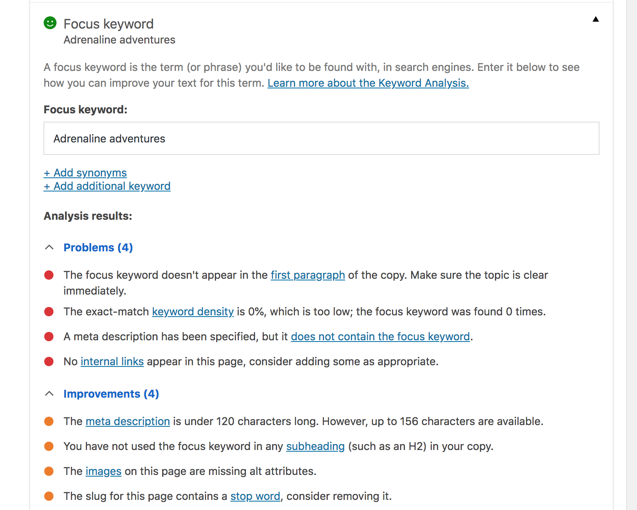
With an SEO plugin you can:
- Easily modify titles and meta descriptions for many posts.
- Manage open graph tags for social media.
- Optimize your content for a specific keyword.
- Analyze on-page SEO.
- Check difficulty of reading.
- Create sitemap and robots.txt.
- Manage redirects.
- And many other things.
Not a bad list, huh? Imagine doing all this stuff on your own.
4. Create a sitemap
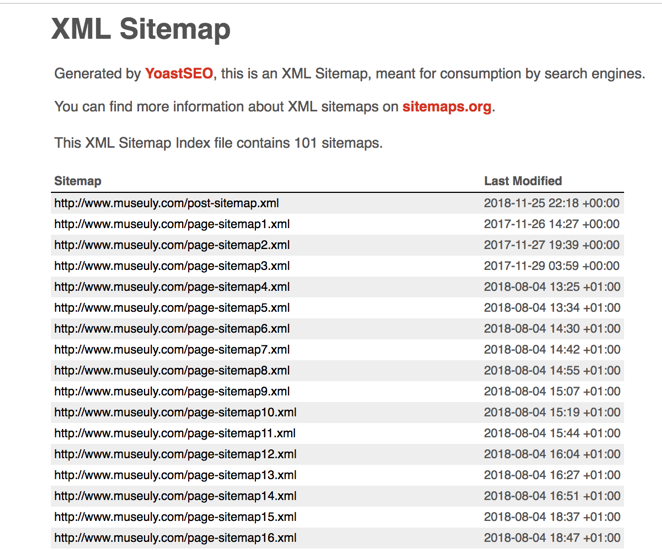
Make sure you have your sitemap.xml and robots.txt files.
What is a sitemap?
A sitemap is basically a list of all your pages. You can auto-generate sitemap with Yoast and then make sure to submit it in Search Console.
This way, Google search bot will be automatically notified and immediately crawl new pages on your site. Therefore, you will have faster indexing and your pages will appear in search results faster after publishing.
A sitemap is especially important for new sites.
5. Robots.txt
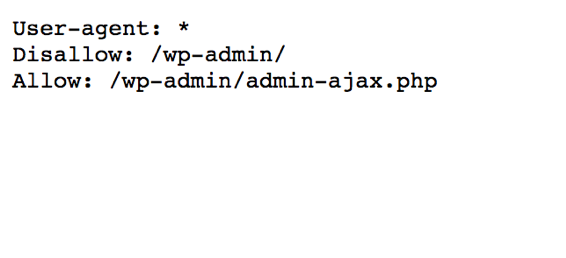
Make sure you have a robots.txt file. This a very simple file with just a few lines of code, created for search bots, where you specify indexing status of your site.
For example, with robots.txt you can enable or disable indexing for the whole site or specific pages and folders.
Tip one: For fresh new sites, don’t forget to uncheck the box in Settings -> Reading "disable search engines from indexing this site". If this box remains checked, your content won’t be discoverable by search engines.
Tip two: It is considered good practice to discourage search bots from indexing some of WordPress files and folders - e.g. /wp-admin folder.
6. Google Analytics
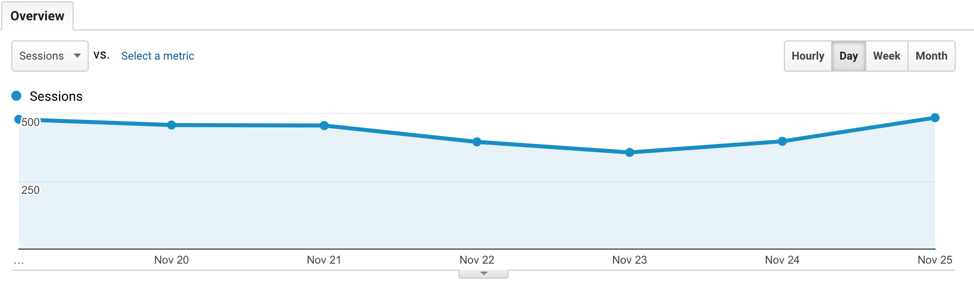
Obviously, you need to track your site traffic.
Again, there are a number of options. Some bloggers prefer JetPack, but I would recommend Google Analytics, as it excludes bot traffic.
To install Google Analytics, you will need to create a free GA account and then put GA snippet on all your pages. To simplify the process, try MonsterInsights WordPress plugin.
With help of Google Analytics you can analyze:
- Acquisition (where your users come from).
- Audience (who are your users).
- Behavior (what do they do on your site).
- Conversions (how they convert).
7. Search Console
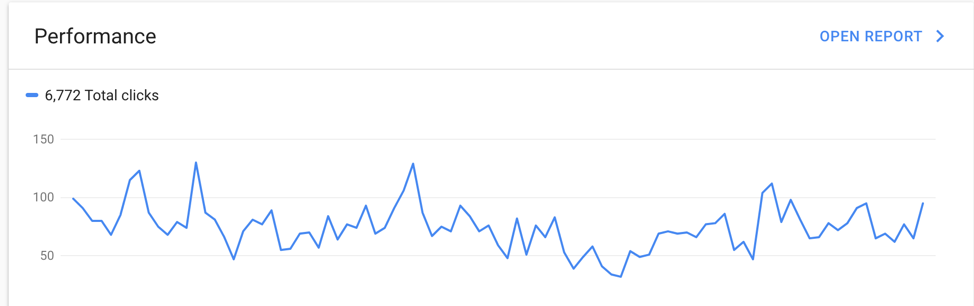
Search Console (former Google Webmasters) - one of the central tools for your SEO journey. It’s free and developed by Google (so, it has a lot of trusted data).
When you create a profile and verify your site in Search Console, this is what you need to do.
- Set the preferred location of your traffic (e.g. if most of your traffic comes from the US, you can tell that in Search Console).
- Submit sitemap.
- Check robots.txt.
- Request indexing (if you want Google to speed up crawl of a specific new page, you can do that in Search Console).
- Check tech errors (structured data, rich snippets, AMP pages, mobile performance, etc), Google will notify you via Search Console, that something is not right - fix these errors.
- Monitor your organic traffic - Impressions, Clicks, CTR and average position.
Of course, if you want a more advanced overview of your SEO performance, you can try premium tools, such as OnCrawl.
Tip: Connect Search Console with your Google Analytics account. This way you can relate all GA data to specific search queries.
8. Tag Manager or Google Optimize
Google Analytics is a great tool, but sometimes it’s not enough, especially if you want to track events and optimize your conversion. Consider installing Google Tag Manager or Google Optimize - great free tools that allow you to track events, clicks, form submissions and optimize your site accordingly.
8. Image optimization
One of the most common mistakes bloggers make is not optimizing images. Large images can significantly slow down your loading speed, increase bounce rate and decrease Google rankings.
There are plenty of image optimization WordPress plugins, which will automatically optimize your image on upload, including Smush and Tinify.
Remember, optimized images help make your website faster and could, therefore, boost your site's ranking in Google.
9. Caching
Use a caching system or plugins to speed up your website. As with image optimization, doing this can have a positive effect on your conversion rates and Google ranking.
It's relatively easy to find a good freemium caching plugin, with options including W3 Total Cache, WP Rocket and others.
10. CDN
Enable content delivery network. Some premium hosting providers (that’s why you need to choose a good one) have a CDN option, which makes your site faster, as your content is delivered from the nearly located server.
11. AMP
One of the great WordPress SEO tricks, which boosted my Organic traffic by more than 30%, was implementing AMP.
AMP (Amplified Mobile Pages) is a new technology, pushed by Google, which makes your mobile pages lightning fast. Google prefers these pages in search results so will likely increase your rankings as a result of you using them.
You can either hire a developer to create AMP templates for your site or just start with a free AMP plugin.
To sum it up
This is a quick checklist of main Tech SEO things you need to implement for your new WordPress site. After you are done with tech setup, it’s time to work on high-quality content and link building. What works for you?
Andrew Gorok - SEO specialist, blogger & online marketer with more than 10 years of experience. I specialize in keyword research, rank tracking, tech SEO and on-page optimization. Also, sometimes, I contribute to my blog
Online Hikes and travel platform
Museuly.