One of the fundamentals of your SEO strategy should be keyword research, for which you need a keyword tool. Here are seven of the best, plus three to help with YouTube SEO
SEO is a complex job. There are lots of things to do to get it right, including tags to optimize, backlinks to build, and so on. Yet you can make an argument that the most challenging part of the process is keyword research.
Keyword research is the foundation of all successful content creation. Think of keywords as the poles upon which you pitch the tent of your content. Once you find the right keywords, you’ll be able to create content that ranks.
The first thing that might pop into your head upon hearing “keyword research” is Google Ads. This has a couple of great tools (Google Ads Keyword Planner is always a favorite), but the market is full of options at the moment! Some of them are the best at volume while others are great if you want to see keyword ranking for every Google search you do.
None of the popular choices are terrible, of course, but the best keyword finders do stand out from the rest. So here’s the list of seven tools I find most useful, plus three more for all your YouTube keyword research needs. It is the second most used search engine in the world, after all.
1. Rank Tracker
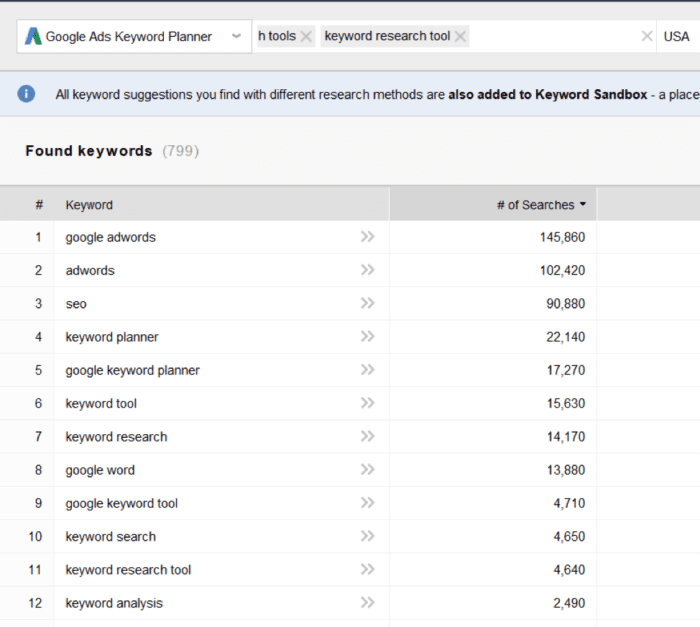
Rank Tracker is part of the SEO PowerSuite software pack, and a big reason for you to use the pack.
Rank Tracker is perfect for comprehensive, all-encompassing keyword research. It includes 23 tools to help the user get the fullest possible picture. That, along with precise search volume and difficulty parameter, essentially makes Rank Tracker a one-stop solution for researching keywords.
The platform has many strengths:
- It uses a variety of different search engines and methods to aid your research. Rank Tracker includes Google Ads Keyword Planner, among other keyword research methods.
- It has a useful keyword difficulty metric to help you assess your chances at ranking high.
- It analyzes expected visits for content using chosen keywords.
- It helps you find different word combinations, analyzing even the popular misspellings.
- It analyzes an unlimited number of keywords.
- It always gives the exact number of searches.
- With the exception of minimal search algorithm updates, it requires just a one-time payment, instead of a large subscription fee each month.
But there are limitations as well
- It’s not a web-based solution, you have to download it to your desktop.
- It's not very well-suited for beginners.
- The many menus and features might confuse some users at first.
Pricing: The free version is perfectly usable. There are also two paid versions: the Professional pack costs $299, while Enterprise is $699. After the first six months, there is a small monthly fee to pay for search algorithm updates.
2. Google Ads Keyword Planner
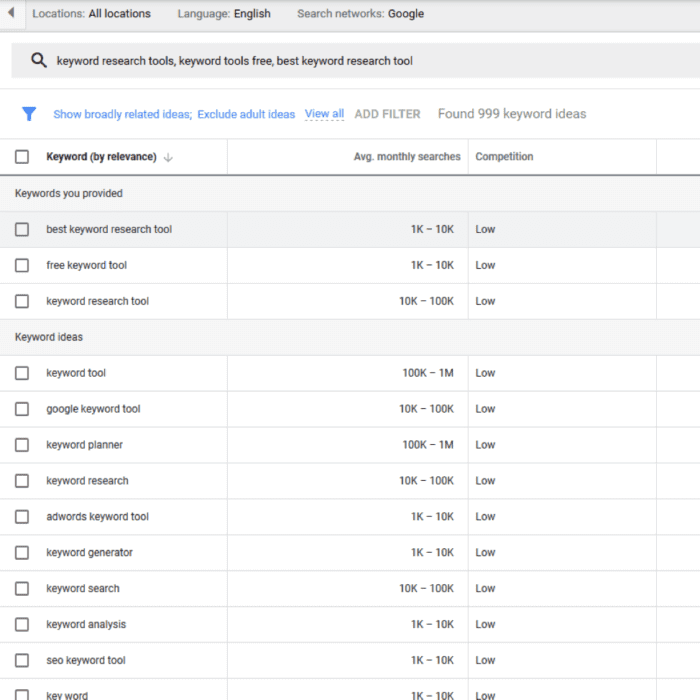
Google's keyword tool! Google Ads Keyword Planner allows users to access Google’s keyword database. It is an easy-to-use, free tool provided by Google Ads.
It’s perfect for users who specifically want to check out Google’s database for keywords. There are also useful parameters worth your attention, such as bids to get to the top of the page for a chosen keyword.
Google Ads Keyword Planner, like the rest of Google Ads tools, is at its most effective and valuable if you are actually running a campaign with Google Ads.
While there are definitely advantages to using Google Ads Keyword Planner in research:
- It's Google - obvious advantage. Google vouches for the data provided.
- It's free.
- It can search for up to 10 keywords/phrases/URLs at once.
There are also some drawbacks.
- The results shown for research are a yearly average. This data is not very useful if you need precision.
- Google Ads Keyword Planner does not differentiate between singular and plural cases.
- The results given by Google Ads Keyword Planner when not running a campaign are vague. The range it gives for search volume is so huge as to make results almost unusable.
- There is no competition analysis tool available.
Pricing: It's totally free.
3. Google Search Console
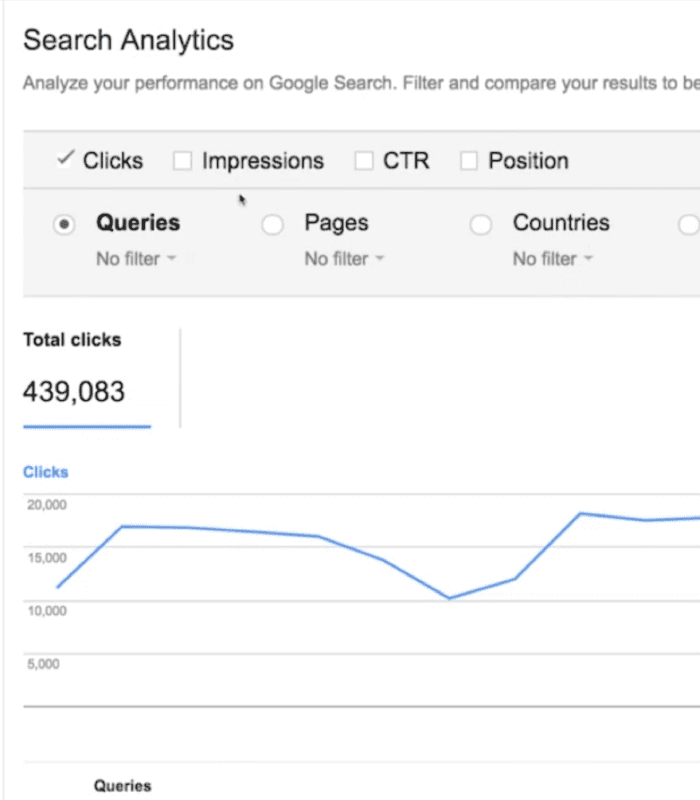
Another product of the Google family! Strictly speaking, it is not a tool for keyword searches, but it can still be useful in that context as well.
This tool is for the people who already have websites with content on them, and articles they want optimized. By using the Content Keywords section of the tool, you can get a report on keywords used in your content and how they perform in search results.
By analyzing CTR, impressions and queries that led people to your pages, you can optimize your content and rank higher more easily.
Among its advantages the most salient are:
- The analytics report, which displays clicks per keyword, their geographic ranking, and CTR.
- It's a good way to check and analyze your backlinks.
- It has an Opportunity Keywords. Using this information to supplement your SEO might net impressive ranking gains.
Its limitations are:
- The search volume given is quite vague, showing a huge (10 times) range. Still can be useful, but not suitable for precise research.
- No way to research the keywords used by competitors.
Pricing: This tool is also entirely free.
4. Keyword Tool
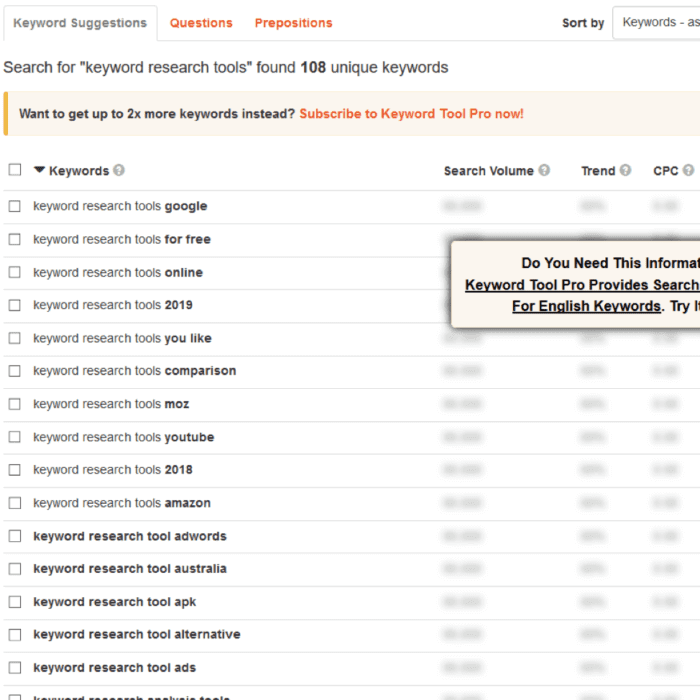
If you just want to check out keyword suggestions for a piece of content, this will do the job. There are also analytics available, but in its free iteration, these are severely limited.
Keyword tool uses the Autocomplete features of engines like YouTube, Amazon, and Google to give you keyword suggestions.
For search volume on Google and Bing it uses their respective Keyword Planners, while for YouTube, Amazon, and eBay, it gives an estimate using clickstream data.
Its advantages are:
- Ease of use - simple and functional search bar.
- It supports eight different search engines, from Google to Twitter.
But the drawbacks are also there, and significant
- It doesn't give a lot of keywords, approximately five times fewer than other tools like Rank Tracker.
- You can only search for one keyword at a time.
- There is no trial available to experience its full features.
- In its free iteration, it only gives you analytics for a couple of top keywords and fewer and fewer with every search.
- No keyword difficulty check.
- No expected visits projection.
Pricing: With monthly billing, Pro version costs $199 per month for the Business version. The more limited Pro Basic and Pro Plus options will run up a bill of $89 and $99 per month, respectively.
If you want to make yearly payments, then the plans will cost $159, $79, and $69 for Business, Plus and Basic plans.
5. MarketMuse
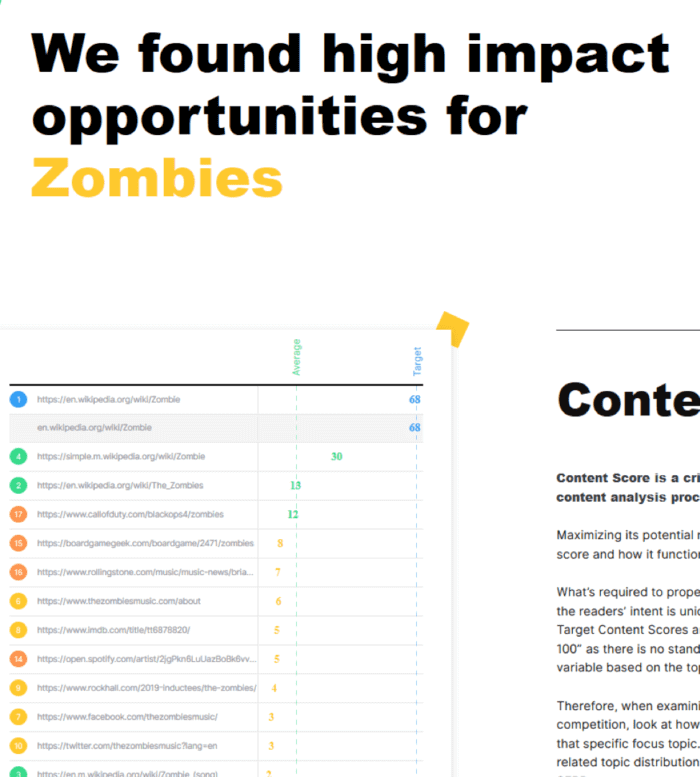
The idea behind MarketMuse is simple but it works in a beautiful way. It is essentially a site content analyzer tool that gives suggestions on optimization. So its target audience is content strategists, SEO specialists and marketers looking to optimize their content.
First, you put in the URL you want an on-page analysis of, your own or competitors’.
The AI analyses it, finds keyword gaps and compares it with the top-20 related URLs.
Among its advantages are:
- Handy and useful visualizations along with advice on improvement.
- A personalized approach to each user with content strategist to answer your questions.
In other ways, it's still limited:
- The guidelines it gives are not 100% in line with rankings. Treat results with care and don’t blindly follow all of it to a T.
- It might be overwhelming for new users, as the tool is quite comprehensive.
- Its free features are very limited, showing you only the most perfunctory results.
Pricing: This isn't made public.
6. Keywords Everywhere
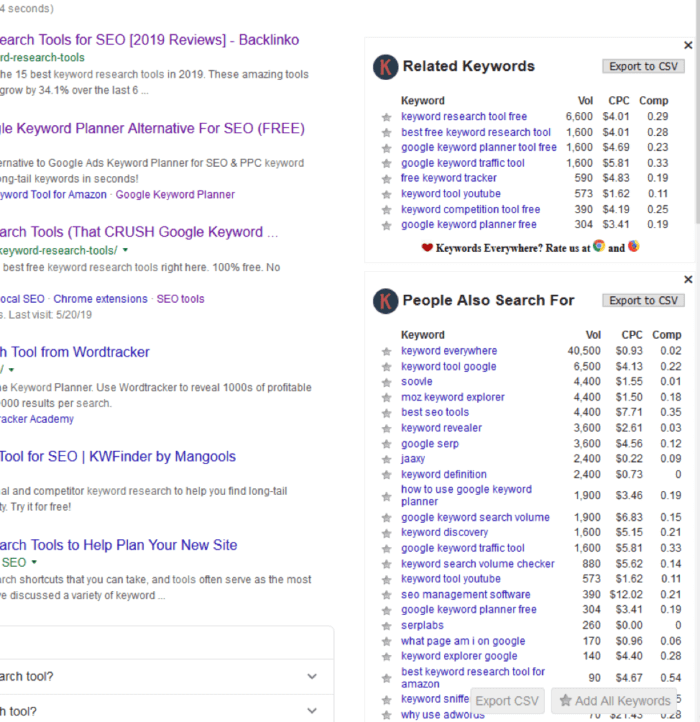
This is a free keyword tool that comes in the form of a browser extension available for Chrome and Firefox. Keywords Everywhere uses Google Keyword Planner’s database for its search results.
Keywords Everywhere does not give you a lot of keyword suggestions, for sure. That said, it is very useful if you want to be able to check analytics for every Google search you do.
Right on the search page of your browser it gives you CPC, provides you with search volume, and data on competition. While you can see the volume on sites such as Amazon, YouTube, etc., keep in mind that those results are only based on Google volume.
The advantages of Keywords Everywhere are:
- It’s a free tool.
- It’s an extension! Simply Google your keyword and see related keywords, extended searches, CPC, and more.
- Perfect if you want to see info with every search you do.
The drawbacks include:
- A small number of keyword suggestions.
- Only seven regions to choose functionality from.
Pricing: Another free tool.
7. Answer the Public
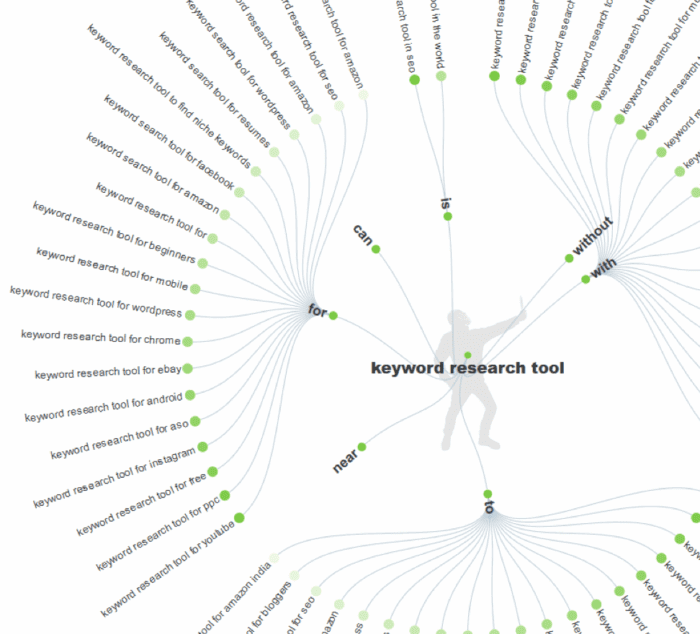
A tool creating large lists of long-tail keywords based on extended Google AutoComplete feature.
It is a very useful tool if you need to generate a topic idea for your content. It’s also quite convenient to find new ways to implement the keywords you want to rank for.
Answer the Public shows keywords with dozens of different modifiers. Then it arranges those into neat alphabetical columns. It helps you find new ways to phrase your keywords, as well as cover all of the related topics.
Among its advantages are:
- It’s a straightforward search bar with nothing there to confuse you.
- Even the free version is usable for research.
- Unique visual style with an actor playing the proverbial "public" from which you receive your answer.
There aren't many drawbacks, but still:
- The app has no filter - this complicates matters in a big way.
- There is no CPC or competition parameters.
- In free mode, your searches are limited.
- You cannot specify the region in which you are searching in the free version. This might kill the functionality for a huge number of users.
- For a tool that is specifically a keyword finder, it’s quite expensive.
Pricing: There is a free version, and also a Pro one which costs $99 per month.
So this is the seven exceptionally useful tools for keyword research - now for some bonus tools!
3 best tools for YouTube keyword research
Making a video is always more difficult than writing a post (I can attest to that personally). So there will always be less competition.
Despite some misconceptions about it, video still needs to be optimized like any other form of content. As there are still tags, titles, playlists, and descriptions, there is still space for SEO.
As always, keyword search is a good way to come up with content ideas and properly optimize the content you already have.
1. Tube Buddy
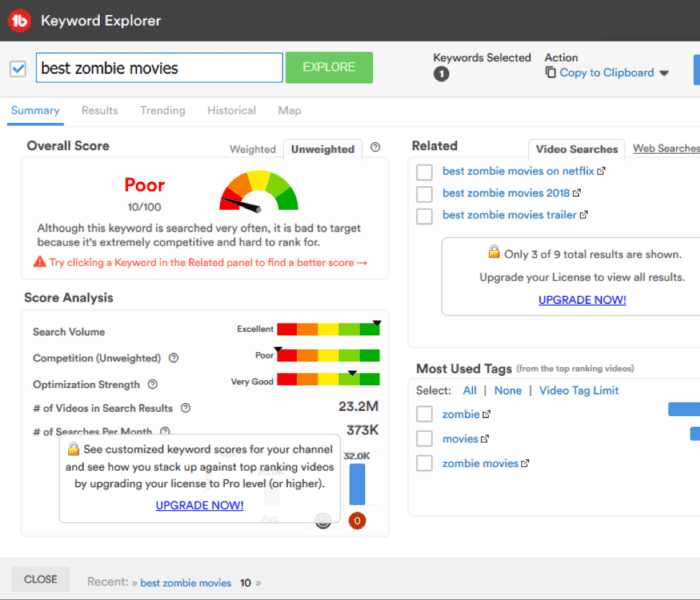
A convenient app built as a browser extension. Tube buddy is great if you already have a channel with some content on it.
Tube Buddy is designed to help you run a YouTube channel and see what you need to optimize.
It gives you access both to advanced analytics of your own content, as well as to a robust keyword database.
Its advantages include:
- It's an extension so no need to download anything or visit a website to start researching.
- It's cheap when you compare it with competitors.
While the drawbacks are:
- There is a one account - one YT channel policy in place.
- The free version is lacking in features such as tracking keyword rank.
Pricing: A free version exists, though it’s limited. The Pro version is $9 per month, Star is $19, and Legend will cost you $39 each month.
Also, for channels with under 1,000 subscribers, Pro version comes at a 50% discount.
2. Morning Fame
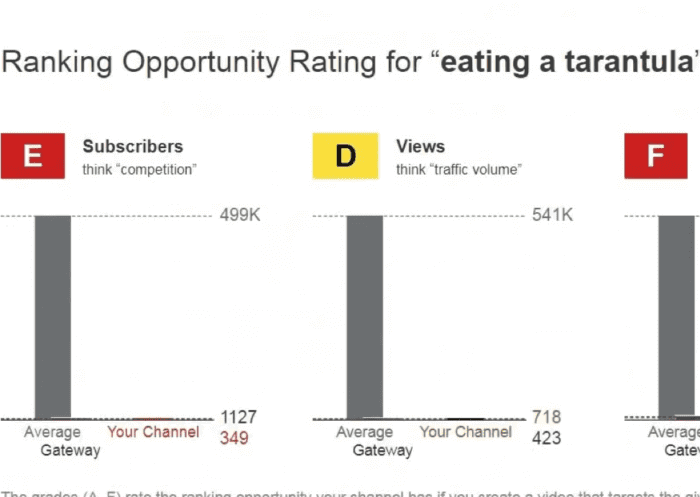
An analytics tool that gives you actionable, implementable advice.
Morning Fame is compact, easy to use, cheap, and functional. Now, "cheap" does not mean "free", which is a disadvantage in my book. It’s perfect if you’ve just made a video and want to get an in-depth look at its progression.
The data on keywords given by the tool is easy to use and convenient, though - well worth the price.
Among the advantages I'd name:
- Real-time analysis. By sifting through analytics for days on end, it provides comprehensive data to users.
- Very accessible price.
- Automatic comparison to your competitors. It also provides a list of areas for improvements to your channel.
While the drawback would be:
- No free version and the only way to get an unlimited keyword research tool is to pay for a Plus version.
Pricing: There are two subscription types: Basic plan for $4.90 per month or a yearly subscription worth $46.80. Also a Plus plan for $12.90 per month or yearly plan for $118.80.
3. VIDIQ
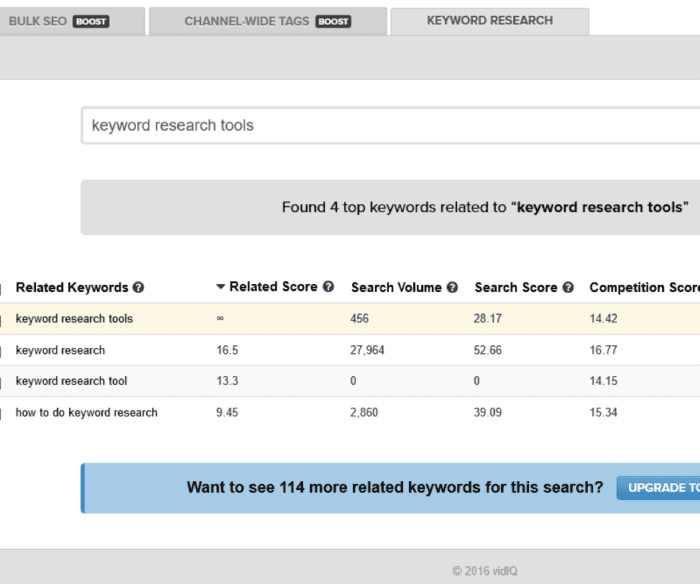
VIDIQ offers many tools, it’s an entire suite for YouTube SEO. Its standout features, though, are its keyword research tools.
It allows you to see exactly how the successful and recommended videos are optimized. Then you can figure out what you’ve missed, what you need
The advantages are:
- Another convenient Chrome extension.
- You see the average views and subscribers that videos ranking that selected keywords get.
- There is also a version of keyword difficulty category - Keyword Score. So it’s easier than ever to find a niche and shine in it.
- There is a keyword translator tool to help you optimize for the same categories in other languages.
Drawbacks:
- Keyword research tools are only available in its paid iteration
Pricing: The free version is called Basic, though it doesn’t have keyword research tools. There is also Pro for $7.50 per month and Boost for $39 per month.
So here you go - seven great tools to try out for research into keywords for text content and three amazing ones for video! Go ahead and try, mix, match, and find your perfect keywords.
*Prices correct at time of publishing (July 2019).
Aleh Barysevich is Founder and Chief Marketing Officer at companies behind
SEO PowerSuite, professional software for full-cycle SEO campaigns, and
Awario, a social media monitoring app. He is a seasoned SEO and social media expert and speaker at major industry conferences, including 2018's SMX London, BrightonSEO and SMX East.