August 2010 update
Google has announced a major upgrade to their Analytics Intelligence feature. I'm a big advocate of the custom alerts GA Intelligence (not the automated alerts) since it helps the process of making analytics useful by alerting marketers to problems or opportunities rather than us having to remember to review.
The main feature for all to be aware of is the inclusion of AdWords data which has I noted below in the guide was the biggest omission. It still only provides top-level figures across all campaigns but it gives a good way of independently checking your spend effectiveness particularly if you have an agency investing separately in Adwords for you. I suggest setting up alerts for:
- Impressions
- Cost - total and Cost Per Click
- Clickthrough rates
Depending on your level of investment a good threshold to start with is + or - 5% comparing to the same day in previous week or week-on-week.
If you have a transactional site with Ecommerce set up in Google Analytics be sure to setup alerts for transactions and revenue comparing to the same day in previous week, if you don't already have a system for doing this... If not, goals have been made easier to track across all 20 goals for non-transactional sites.
Original Oct 2009 post explaining how to use feature
Google Analytics Intelligence is a useful new feature introduced in the October 2009 Google Analytics update which looked helpful to combat the "€œinformation overload"€ from web analytics through alerts intended to "€œprovide automatic alerts of significant changes in the data patterns of your site metrics and dimensions over daily, weekly and monthly periods"€.
While many blogs commented on the launch, I haven't seen much since on how to use it in practice, so I wanted to write this tutorial to show it can be used in practice. I would like to know what others think / how they have used it.
This post mainly describes how to use custom alerts and how I"€™ve found it so far. I"€™ve presented it as a Q&A / step through of the features. I've discussed this feature with my colleagues at ClickThrough Marketing, and we're using it more on client projects where we're using Google rather than Yahoo! Web Analytics for tracking.
How to use the Google Analytics Intelligence feature
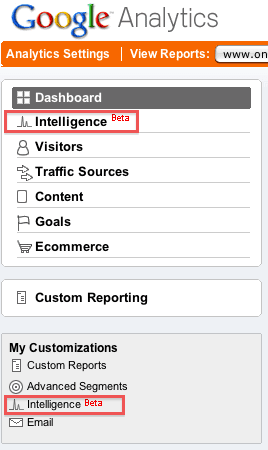
Step 1. Where do I find Google Analytics Intelligence?
It"€™s given pride of place in the top left of Google"€™s sidebar nav, suggesting it is going to be a major feature in the future. The announcement said this was only the first stage.
Step 2. Which mode should I use to help me?
Simply put, Intelligence highlights problems or opportunities in your digital marketing indicated by relatively big fluctuations in metrics you"€™re tracking.
GA Intelligence works in two modes currently:
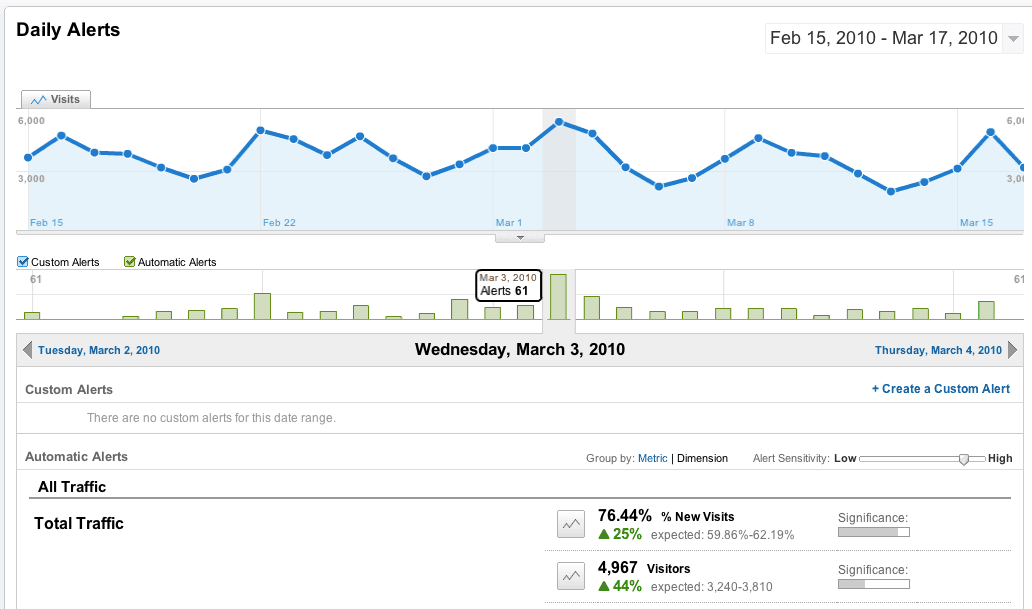
First automatic alerts mode where an algorithm built by those clever Google PhDs shows a fluctuation which is significant within a confidence interval. These are shown by the green bars, when you click on those, you see further info on the nature of the fluctuation.
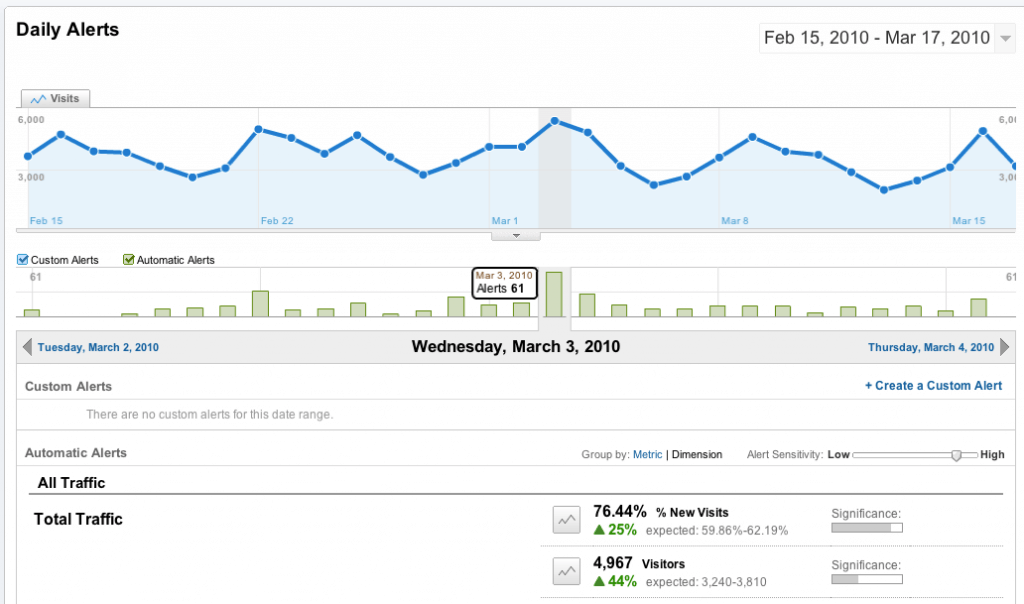
I have found automatic alerts not so intelligent in practice, since the daily alerts are, in my experience (typically) not earth shattering - simply fluctuations you would expect, as shown here in traffic or incredibly granular info such as "€œvisits from iPhones in North London up by 500%"€ (I made that one up).
The weekly / monthly alerts don"€™t seem so good at picking up significant changes.
I haven"€™t given the automatic alerts an exhaustive trial, so would like to know if / how they help you.
Reducing the sensitivity is one tip I would make - you do this from "My customisations".
The second mode, custom alerts is what I'll concentrate on here showing how they can be used for SEO. For me these are more useful than the Automatic Intelligence and agencies and clients should set them up to show big fluctuations in traffic. These are some alerts I have set up for one client:
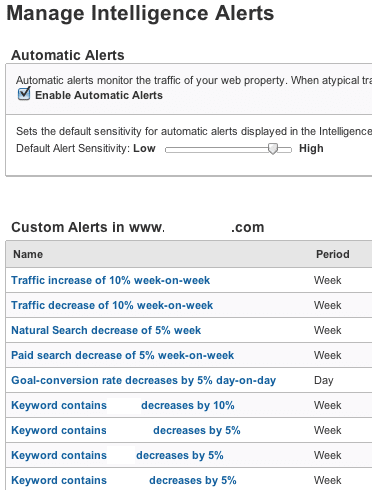
Step 3. How to setup custom alerts for SEO
The steps here are :
- Choose Create New Alert on Right via the button on the right.
- Brings up 'Create an Alert' dialogue as shown below.
- Choose a detailed, meaningful name like the ones above
- Apply to a profile - this will normally be the profile you are viewing
- Choose period - weeks and months work best generally since there are significant daily fluctuations, e.g. from Friday to Saturday.
- Set alert conditions - for SEO we are mainly interested in conditions of medium matches organic, keyword matches a value, or better keyword contains a value to aggregate traffic across values.
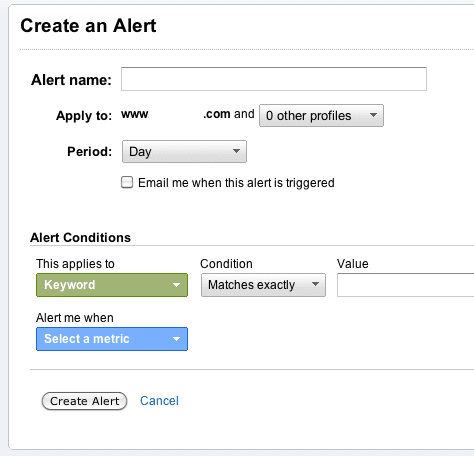
You are limited in the alerts compared to custom segments since you can only chose a single condition, not boolean currently.
Step 4. Setup PPC alerts
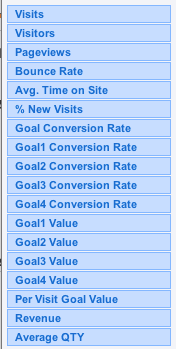 I"€™m more of an SEO person, but a similar approach can be used for top-level PPC reviews. However, the most useful metrics for Pay Per Click such as cost-per-click or cost-per-acquisition aren't available as you can see on the right. You can still set up alerts on Pay Per Click traffic for:
- Bounce rate increasing above threshold
- Conversion rate falling below threshold
- Revenue dropping below threshold
So, if you're not using the intelligence feature, I hope this encourages you to trial it, and if you are, it would be good to know what you have found works best? Thanks.