Digital marketing planning spreadsheet
An Excel spreadsheet to create an online marketing campaign media budget
How will this template help me and my business?
Many business don't have clear, SMART objectives for their digital marketing. Without experience, it can be difficult to know how to create a more data-driven approach to digital marketing.
This Microsoft Excel spreadsheet has been created to help you create a clearer acquisition plan to improve leads and sales. The spreadsheet will enable you to create a budget for the year ahead to define and then optimise your investment in search marketing, display advertising, affiliate marketing and online PR.
Using this spreadsheet will give you confidence that you have defined more realistic targets for leads, sales and profit.
These spreadsheets from Dave Chaffey of Smart Insights were previously included in the acclaimed book Web Analytics 2.0 by Avinash Kaushik, Google’s highly regarded Digital Marketing Evangelist. They have been fully updated to cover the most important digital marketing channels today from SEO and Ads through to YouTube and Facebook marketing.
Who is this spreadsheet for?
This 'hands-on' conversion-funnel based spreadsheet is designed for anyone making the case for investment in digital marketing who wants to show with more confidence the results they will get in terms of visits, leads and sales against the channels they invest in. This includes:
- Digital marketing managers
- Customer acquisition managers
- Marketing managers
They require some experience of KPIs for measuring digital marketing campaigns which we explain in the recommended resources.
How is this spreadsheet structured?
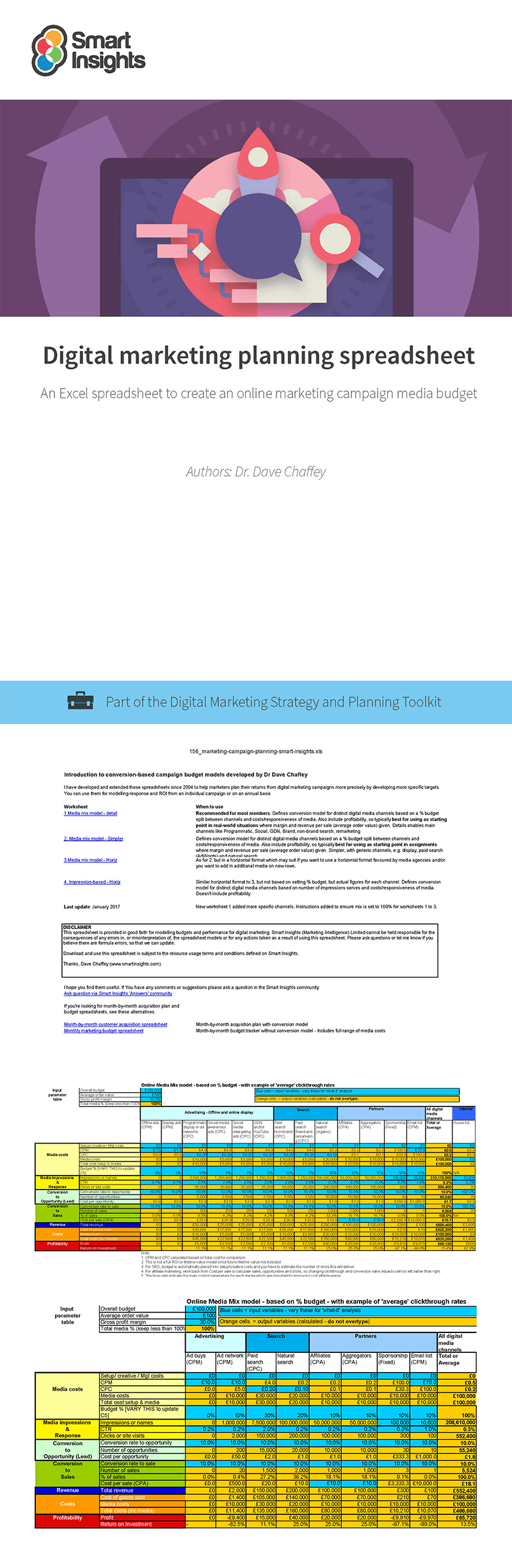
The template includes these features to calculate your planned marketing outcomes from annual plans or campaigns where digital marketing is the main investment.
- Set your overall budget and quickly adjust the percentage investment in different media channels to see the impact on your forecast results
- Channel options available include SEO, Google Ads, ad networks (cost-per-click), display (CPM), social media, remarketing, sponsorship, email marketing and owned media
- Automatically calculates response, leads, sales and profit based on media investment
- Allows you to specify different response rates for different media channels
As explained on the ‘Read Me’ worksheet, you have a choice of different tabs/worksheets depending on how much detail you want to go into. We recommend the detail media mix model which defines conversion models for distinct digital media channels based on a percentage budget split between channels and costs/responsiveness of media. The details enables the main channels like programmatic, social, GDN, brand, non-brand search and remarketing to be modelled.
Resource Details
- Author: Dr. Dave Chaffey
- Format: Excel template
- Recommended related resources: Conversion and revenue model spreadsheet, Month-by-month customer acquisition spreadsheet and Monthly marketing budget spreadsheet
Dave Chaffey explains how these spreadsheets originated:
“I have developed and extended these spreadsheets since 2004 to help marketers plan their returns from digital marketing campaigns more precisely by developing more specific targets.”
About the author
Dr. Dave Chaffey
 Dave is co-founder of Smart Insights and creator of the Smart Insights RACE Planning Framework. He has consulted and trained for many businesses including large international B2B and B2C brands including 3M, BP, Barclaycard, Dell, Confused.com, HSBC, Mercedes-Benz, Microsoft, M&G Investment, Rentokil Initial, O2, Royal Canin (Mars Group) plus many smaller businesses. For his full profile, or to connect on LinkedIn or other social networks, see the About Dave Chaffey profile page on Smart Insights. Dave is author of 5 bestselling books on digital marketing including Digital Marketing Excellence and Digital Marketing: Strategy, Implementation and Practice. He has been recognized by the Chartered Institute of Marketing as one of 50 marketing ‘gurus’ worldwide who have helped shape the future of marketing.
 Paid membership is required
Access this resource now
You can purchase this individually or as part of a toolkit.
See this resource on our store Already own this?Login here