Unravel your customer journeys with Google Analytics clickstream analysis on forward and reverse paths
I don't know whether you have heard of the forward and reverse path clickstream analysis technique? It's a shame path analysis isn't so well known as say funnel analysis, since it's a strong analysis technique to help understand customer journeys on a site to identify inefficiencies.
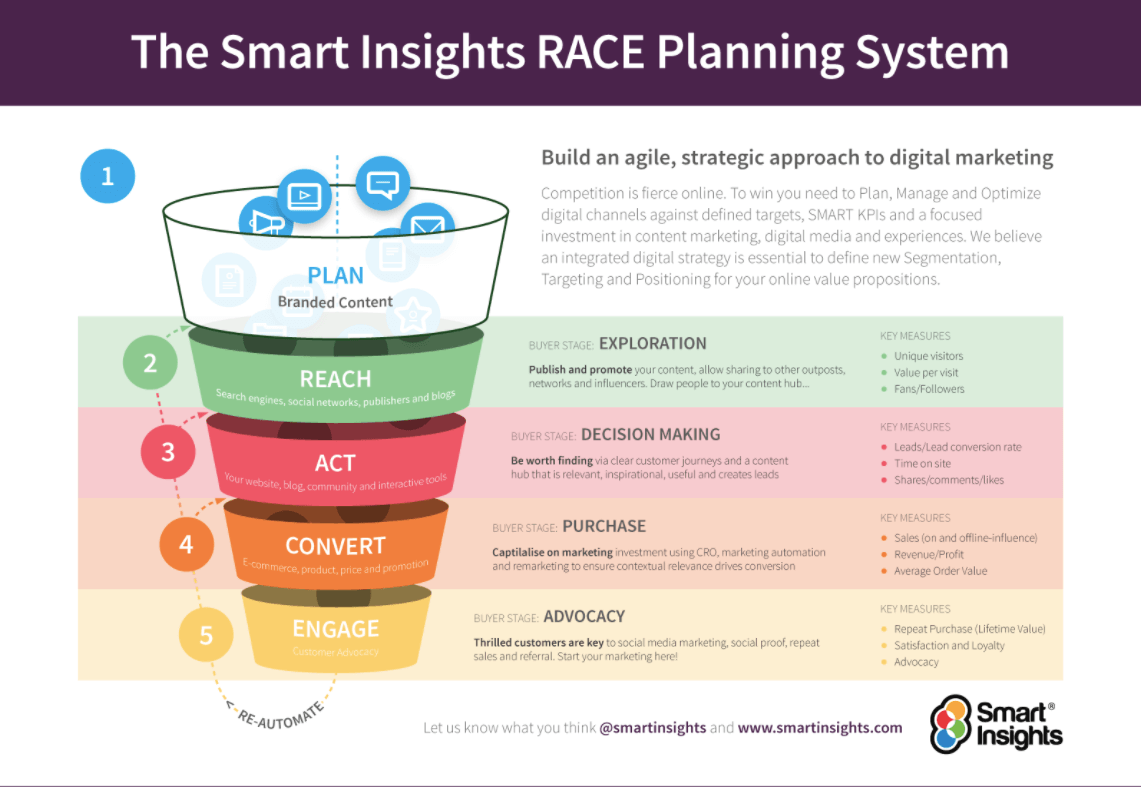
Clickstream analysis can be used to review the quality and value of your REACH marketing activities, as well as informing crucial decision-making in the ACT and CONVERT stage of your customer conversion strategy.
Need a plan to create a winning marketing strategy?
Get started today using a tried and tested step-by-step process to optimize your marketing.
Start Now
What is clickstream analysis?
Clickstream analysis is the strategic analytical activity of reviewing the order of URLs visited and the actions taken during your customers' journeys on your site. By analyzing their forward and reverse 'path' you can track patterns and trends in your conversion funnel, towards your goals.
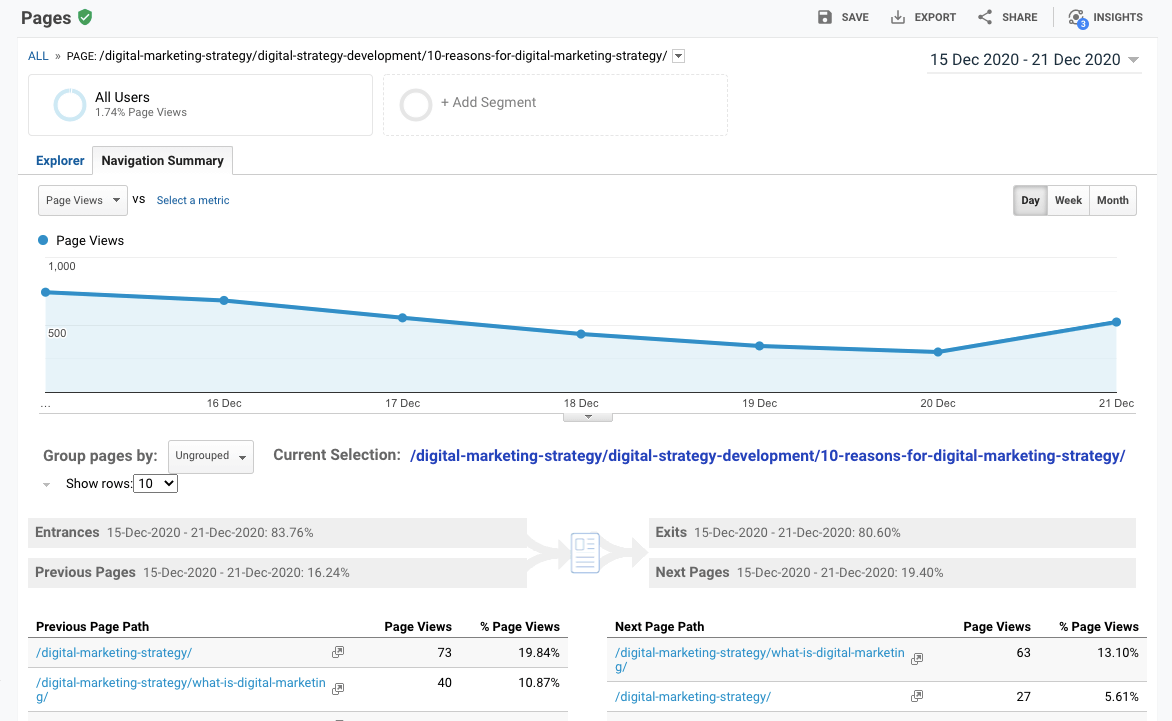
In Google Analytics, use the "Navigation Summary" for paths forward or backward from a page. You can get to this by selecting the URL you're interested in in the Behaviour \ Site content \ All pages left-hand menu.
Core Module
Reporting on marketing activities using Google Analytics
Part of the Google Analytics Toolkit
Learn how to use reports to review performance in Google Analytics
Learn MoreAs you can see from the example above - our popular blog 10 reasons you need a digital marketing strategy in 2021 received nearly 20% of its previous page views from the previous path page our tag page 'Digital Marketing Strategy'.
The clickstream analysis demonstrates a successful user journey for users who first searched for the 'TOFU' term and then navigated to a longer-tail, MOFU blog article.
Slightly lower down the list, below the cut-off, we can see that just under 4% of viewers to this blog next navigated to our pricing page - a very valuable BOFU page in the user journey. Thus, our clickstream analysis has provided insights about user journeys to the pricing page.
Having identified this journey, if we wanted to make a change, using CRO to make the '10 reasons' article more prominent on the Tag page, and the pricing page more prominent on the '10 reasons' article, this may lead to an increase on the 20% and 4% conversions, and increase our paid membership!
Advanced Module

Conversion optimization
Part of the Digital marketing strategy and planning Toolkit
Learn about the principles and best practices for setting up a simple AB test and a broader CRO programme
Learn MoreMarketing implications:
A forward path analysis reviews the popularity of destination clicks that occur from a page. This analysis is most beneficial from high volume pages such as the home page, category or landing pages.
I use this technique to identify: messaging, navigation and page template combinations which:
- Yield the most clicks from a page. These approaches can then be deployed elsewhere on the site or page
- Work poorly and yield a relatively small percentage of clicks from a page
A reverse path analysis indicates the most popular combination of pages and/or calls-to-action run-of-site or run-of-section which lead to a page.
This is particularly useful for transactional or outcome pages such as:
- The first checkout page on a consumer site
- A lead generation or contact us page on a business-to-business site
- An e-mail subscription page
- A call-me back option
Core Module
Improving basket, checkout and form completion
Part of the Digital experience management Toolkit
Learn how to optimize your basket, checkout and form completion sequences to provide a seamless journey for customers and maximise conversion
Learn MoreThere are a couple of points to note:
- To explore the implications of digital marketing channels, you can filter using the segmentation tools to include or exclude channels
- Or, segment to show the relative value generated from a link, e.g. through segmenting on number of transactions
- If the Site Overlay report is working for you, this gives another option to visualize click volume and click value
Core Module
Improve digital customer experience
Part of the Digital marketing strategy and planning Toolkit
Learn how to review and improve the effectiveness of your digital experiences, focusing on how website experience quality can be improved to encourage customer engagement and loyalty
Learn More