Google Analytics 'Share Assets' for sharing report customisations within or between companies
I’m not sure if many people have discovered the ‘Share Assets’ option/button within the Profile menu of Google Analytics yet, but I only spotted it at the end of last year. With the launch of Google's New Analytics Solution Gallery which Dave has introduced we thought a reminder about this 'hidden feature' would be useful.
What is Share Assets?
Share Assets gives you a quick way to It’s a handy way of viewing and sharing all segments, custom reports and dashboards from one place. Select the configurations you want to share and then share the URL.
The data relevant to each site in the profile isn't shared, it's only the customisation.
How long has that been there? I'm not sure, but I'm a regular user, so not long. It certainly makes sharing configurations so quick and easy now. Really handy if you have several people with individual access in a company or you're working for an agency or as a consultant and you want to share report template or advanced segment for a different client accounts.
Where is the Share Assets option?
You can find this for each Profile by selecting Admin from the top navigation in Google Analytics and then selecting the profile for which you want to share Assets.
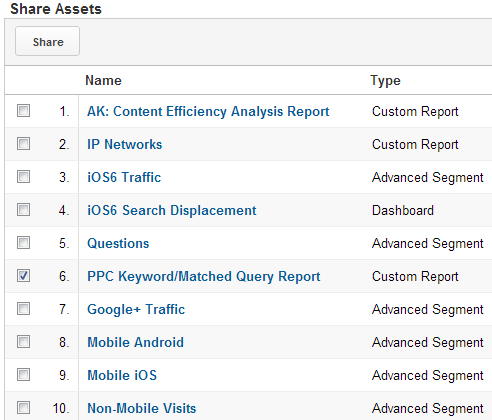
 If you click on ‘Share Assets’ it will load up a list of reports, segments and dashboards associated with that profile. From here you can check any of the reports, dashboards or segments which you would like to share.
How to Share?
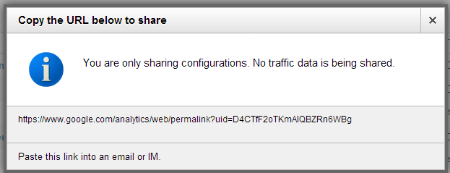
Once you’ve selected a specific report, dashboard or segment you can then click on ‘share’ at the top. You will be given a unique URL to share by pasting into an email or any other forms of communication.
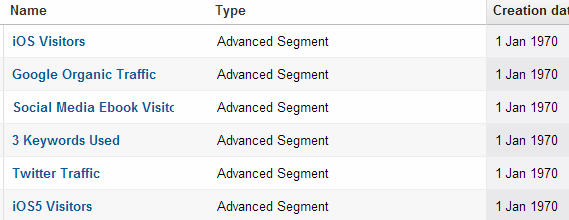
You can also sort the list by ‘Creation Date’ but I’m not sure if the dates are quite right as you can see from the screenshot below:
When the link is pasted into a browser, the user can then decide which profile(s) they want to apply the different assets to. Each asset can be shared to different profiles if needed.