We've all seen those lists of the world's 'Top 10 converting websites' and thought 'what could I do to get my site to those stratospheric levels?'.
This post explains why you probably wouldn't want your site to be on one of those lists, and how you can change 'conversion rate' from a not-very-useful-at-all metric into a tool to help improve your site.
The post covers 3 simple issues every business needs to review:
- What is conversion rate?
- Why isn't it the answer to all of the world's problems?
- What can you do to make conversion rate more meaningful?
What is "Conversion Rate"?
"Conversion rate" is the percentage of visits to your site that result in a "conversion". For most of us, a conversion is either a sale, or a lead of some kind, typically related to the number of visits or sessions:
Conversion Rate = Number of Sales / Number of Visits
In other words, if your store is visited 100 times and 5 of those visits ends in a sale, you have a 5% conversion rate.
The reason people care about that, and the big idea behind conversion optimization, is that if you can figure out how to increase your conversion percentage, you will make more sales for the same traffic costs.
Why "Conversion Rate" Isn't the Answer to All Your Problems
Here are 5 reasons you should never take an overall site conversion rate at face value:
1. A Higher Conversion Rate Doesn't Always Mean Higher Performance
The simplest way to explain this is through an example. Here are the stats for 2 days of activity on an ecommerce site:
- Day 1: 4% conversion rate. (5000 visits, 200 sales)
- Day 2: 10% conversion rate. (1000 visits, 100 sales)
On day 2, conversion was more than double the rate from day 1. Yet, reading the actual numbers hidden behind the overall conversion rates, it's easy to see day 1 was a much better day for the business (assuming all outgoing costs were the same).
2. Not All Visits to Your Site Have the Potential to Convert
When focusing on a headline conversion number, we're pretending that every visit to our site is a potential sale. While that might be true for a particular PPC landing page, its very rarely true for an entire site.
Visitors may be checking the status of their orders, looking for your phone number, checking your 'careers' page, grabbing a link to email to a friend, or any number of other tasks. Focusing purely on improving your overall conversion rate from any given visit ignores all of those other possibilities.
3. Making Your Site More Engaging May Reduce Your Conversion Rate
Let's say you have a pure ecommerce site, with absolutely no content other than products. Your average customer comes to the site once a month and buys once every two months.
To try and improve this, you add a blog to the site with really engaging content. Suddenly, your average customer is visiting the site twice a week.
To maintain your conversion rate, you'd have to persuade your long, loyal customers to buy once per week, instead of once every two months. In other words, your site has most definitely improved, but it's very likely your headline conversion rate will go down.
4. Conversion Rates Vary Wildly Based On Visitor Type
A first-time visitor to your site who has never bought from you before, is far, far less likely to purchase than an old, loyal customer. On the opposite side of that, a very loyal customer & regular visitor is far less likely to be swayed to make a purchase because of little conversion tweaks.
Lumping those 2 groups together is like lumping "first time house buyers" into a big pot with "castle owners" & trying to make sense of the strange "average house price" that throws up.
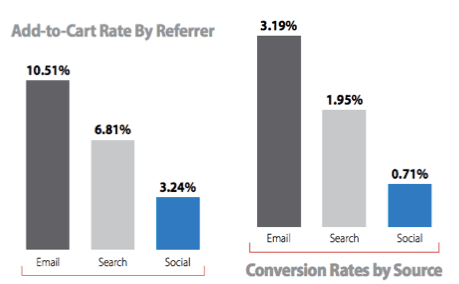
Visitors from different traffic sources / referrers will also differ wildly, as these Monetate retail conversion rate benchmarks show. Direct visitors will tend to convert more highly still since they tend to contain more existing customers. Likewise brand and non-brand search terms, generic vs long tail terms will vary too.
[Ed's note: See Dave's post on analytics segmentation for the many types of visitors]
5. Growing Your Site Will Often Decrease Conversion Rate
Here is another example: Here are 2 alternative tables of numbers for a site bringing in £565k in revenue over the period we're looking at.
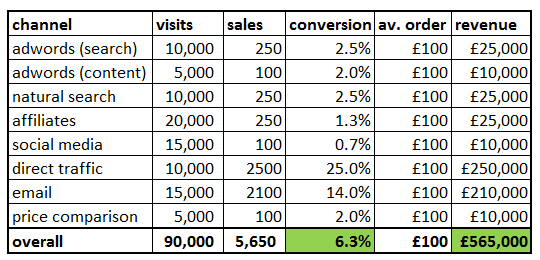
From that we can see most channels convert between 1% and 3%, but visits "direct" to the site & via "email" are far more likely to result in a sale (25% chance & 14% chance).
Now, we decide based on that we're going to focus purely on the best converting channels. We send out more emails, and we turn off many of the other channels:
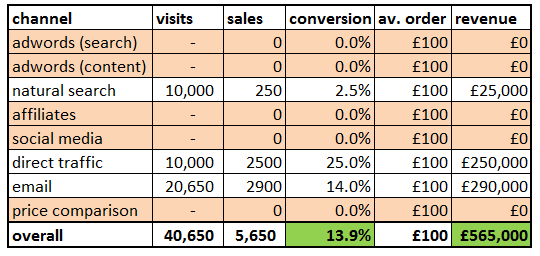
As we can see, our overall conversion rate has more than doubled. Revenue is the same, and we've probably saved a lot in advertising costs.
That all looks fantastic at first glance. But - we've turned off most of the growth channels of the site. Look at the second table again and ask "In a year's time, will we still be able to squeeze out new sales from our same old email list?", "Will we be able to win back the customers our competitors have grabbed from us through their PPC & affiliate campaigns?"
How To Use Conversion Rates In a More Meaningful Way
Despite all of these ugly limitations (and more), conversion is an incredibly powerful tool. Here are some tips to make more sense of conversion, and to take meaningful actions to improve your results.
Always take other numbers into account alongside overall conversion rates.
- Remember an increase in conversion rate can be caused by a vast decrease in visitors coupled with a more gentle decrease in sales.
- Use it as a question prompt rather than an answer. "my conversion rate has gone up 3%, why?" rather than "my conversion rate has gone up 3% [full stop]"
Use it for very specific tasks
- Building individual landing pages around conversion really works.
- Putting together an email with conversion in mind really works.
Break your conversion rate down by channel
- Generally, "acquisition" channels like non-brand pay-per-click will convert at a far lower rate than your site average. Seeking to improve those rates individually will save you far more (and make you far more) money than treating it as part of a bigger 'overall conversion' number.
- Separate out your channels, figure out which you can impact through conversion optimization, and focus on those instead of your headline conversion rate.
Break conversion rate down by visitor type
- Split out "new visitors" vs "returning visitors" (or better yet, "previous buyers" vs "never bought before").
- Remember that superficial site changes are far more likely to affect new visitors than old visitors. Your existing customers are swayed by brand, service, product quality, delivery, etc. Your new visitors are far more swayed by perception.
Break it down by task
- If your site has several key tasks (eg. sales, customer support enquiries, leads, account top ups) treat those as separate conversion tasks.
- If they are important to you, split those tasks out from each other & track work to increase their rates individually.
Focus on microconversions
- Instead of asking "how can I increase the conversion rate of my site?" & wondering where to look first, break this down into smaller chunks.
- Start with your most important pages & journeys, eg "what percentage of searches result in a click to a product page? What can I change about our search results to improve that?"