Developing a Joined Up Approach to your Social Media and Customer Communications
In this post I show how we use different tools and plugins for our different social platforms to let software services take some of the key pounding out of online publishing.
Here is my summary of our process and the tools we use. We're always interested to learn about new tools or other approaches, so let us know if you have other suggestions.
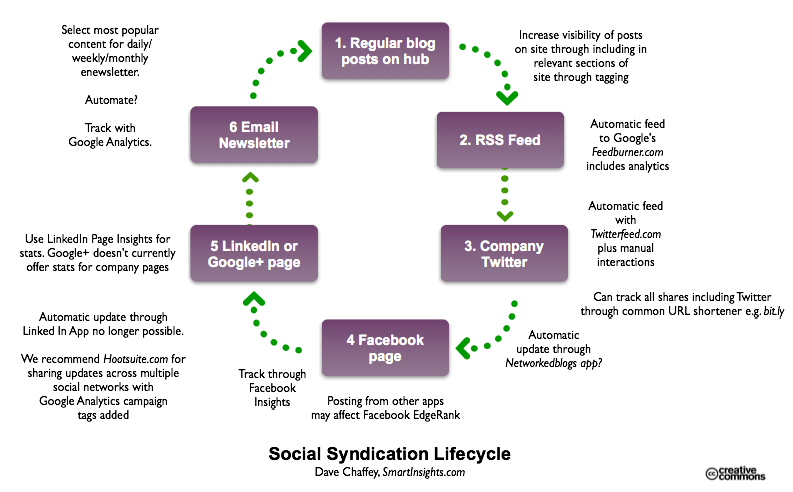
The diagram shows the approach we use on Smart Insights to support content sharing across the main social networks while minimising the resource needed. We aim to publish two to three posts daily as a target, balancing advice and updates on major developments in digital marketing. These are posted to our blog and then we use tagging of topics in different categories to surface the advice in relevant sections of the site. Each post is syndicated to Google’s Feedburner service using RSS feeds which can then be automatically posted to Twitter. We use Hootsuite to post other social networks like Facebook, Google+ and LinkedIn so that a more conversational tone can be used to recommend content or ask questions than is possible simply through updating a social network the title automatically. Hootsuite can also be set to automatically track posts in Google Analytics to show the impact of sharing using social media using campaign tracking to add parameters to the URL of the post. The end of the cycle is where email is used to share content weekly with an editorial written to recommend the most useful posts or major updates for our readers to be aware of.
I'm not saying the approach in the flow chart is the right way, or only way, just sharing how we tackle sharing our content via social media to give folks who follow our posts a wide choice in channels for receiving them. Yet it still gives us time to work on other projects. I'd be interested to know which tools you use since we're reviewing ours or you can check how your agency has set up your social media?
Why automation of publishing can help
"But we don't have the resource to manage our blog/Twitter/Facebook/Linked-In/Enewsletter" is a cry for help we often hear when discussing digital marketing strategies with marketers. That's quite understandable - it all used to be so easy when a monthly newsletter was the main customer e-communications tool.
It really shows what I've been saying for a while, that every company now needs to think like a publisher to engage with its audience online. The diagram shows how the Blog can be the Hub for your E-communications, although for some, with fewer resources Facebook may be a better option - works well for my local pub!
Tools for syndicating and tracking your social media interactions
Here's more info on the tools and tracking we use at each step.
1. Publish via blog
Recommended tool: WordPress - the most popular blogging platform which automagically produces an RSS feed at /feed.
Recommended Tracking method Google Analytics - it's free and of course shows you the popularity of your posts, although the stats interface in WordPress means you don't have to go there or there's a plugin to integrate GA.
2. Syndicate via RSS
Most blogs like WordPress can be set up to publish post summaries to an RSS format - you just need to find the relevant URL to tell the syndication tool about it.
Recommended tool: Feedburner - tell Feedburner your feed address and make it easier for people to subscribe to your feeds. Google no longer actively maintains Feedburner.
Recommended Tracking method With Feedburner you get great stats on "clickthrough rates" of posts and number of subscribers. It also adds Google Analytics campaign tracking tags too. It's been owned by Google for the last few years, so we're sure they'll use it as a positive ranking signal too.
3. Post to Twitter
Recommended tool: We used Twitterfeed for a couple years - it's an online service you tell about your feed address and twitter account and you're done.
You can use IF THEN THAT (IFTTT), for a similar approach.
I use Dlvr.it to automate social sharing.
Although we’re advocating saving time here by syndicating, we need to be careful not just to push or SHOUT – the beauty of social media is that it’s a two-way street enabling conversations and dialogue. So manual interactions with each of the social networks to ask and answer questions is also recommended.
Recommended Tracking method We could do this better - we use Bit.ly to track the popularity of different tweets - useful since it also shows sharing of a post by other routes. To do this tell your Twitter client like Tweetdeck or Seesmic what your bit.ly account details are and you can see the response - if you get time to look at it"...
4. Post on Facebook company page
Recommended tool: Networked Blogs - we used this year ago, I believe it's still active.
Recommended Tracking method Facebook gives Pages owners its Insights which tell you about Impressions and interactions for each message on your page, but not the popularity of individual posts.
5. Linked In page
Recommended tool: Linked In-Twitter integration - this is now a standard feature. Some argue that this will pollute Linked In with too many updates, others say you should encourage key employees to do this in B2B.
Recommended Tracking method - No tracking here AFAIK although referrers will be tracked in Google Analytics.
6. Email Newsletter
Recommended tool: There are many choices here for email broadcast.
Recommended Tracking method: This tracking will be provided by your email service provider who will often provide Google Analytics Email campaign tracking with Google Analytics.
What to watch out for
Although we're advocating saving time here by syndicating by publishing, we need to be careful not just to push or SHOUT - the beauty of social media is that it's a two-way street enabling conversations and dialogue.
So manual interactions with contacts on each of the social networks to ask and answer questions is essential.
Let us know how you tackle this - your process and tools?