An explanation of why Edgerank matters to Facebook marketing - Part 1
So you’ve got a great piece of content all ready to go on your Facebook page. You post and wait expecting the likes and shares to come rushing in. You’ve got several thousand fans but you appear to have generated online tumbleweed moment. Why?
Well, research from allfacebook.com and Edgerank Checker shows that, on average, 83% of your fans may not even be seeing your posts. Facebook suggest as few as 16% of fans are actually reached. That might explain the tumbleweed feel you can get on Facebook.

Data from Pagelever at Inside Facebook suggests the situation is even worse, and the larger the number of fans, the less likelihood of the post being seen.
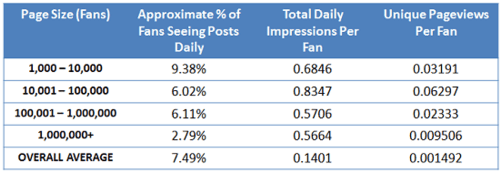
Whatever the actually figure, getting your Edgerank improved is a key task for any Facebook Page manager.
An introduction to Edgerank for Facebook marketers
First let’s take a step back and check that we understand what Edgerank is all about. Edgerank is the name given to Facebook’s optimisation algorithm. Unlike Twitter which presents tweets strictly in chronological order, Facebook applies an algorithm which presents posts according to what it thinks the fan or friend is most likely to want to see.
It’s called Edgerank because activity on a newsfeed such as posts, clicks, likes, photo uploads, comments and shares are known in Facebook-speak as “Edges”. Even listening to a song (using the Spotify app) or reading a newspaper article in Facebook is an Edge. The newsfeed isn’t really a feed of news, instead it’s a chart of what Facebook considers the most important Edges.
This system effectively draws a parallel between your SERPs (search engine result pages) and your Facebook newsfeed. The SERP is driven by the SEO effectiveness of the pages and to a degree, your search history (see verbatim search) whereas your newsfeed is driven by Edgerank.
There are three elements to Edgerank:
Affinity x Weight x Time Decay = Edgerank
Affinity
Affinity refers to how interested you are in a brand’s page or how much of an online friend you are. Facebook gathers this data based on the clicks you have made in the past to that page /friend’s feed plus the number of likes, shares and comments you have made.
If you regularly share or like the content of a particular page, you’ll see that page’s posts appearing more regularly in your newsfeed. Likewise, in theory, updates from friends that you generally ignore online, should start to disappear.
You can get an idea about which friends Facebook thinks you have most affinity with by looking at the friend’s list to the right of your newsfeed. Mine is below, and sure enough, those listed do tend to be those I chat with on Facebook, comment on feeds and like content (funny how my husband is at the bottom of this list….). This can be slightly skewed by those who are currently online which will often suddenly appear in this list even if you’ve not interacted with them in a long time.
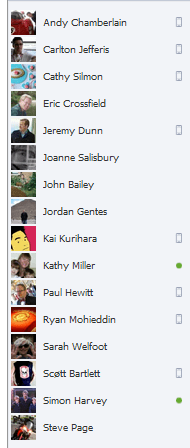
Affinity is a one-way street. This means you visiting a profile doesn’t increase the likelihood of you appearing in their newsfeed. That’s a relief for all those ex-boyfriend/girlfriend stalkers out there.
The big flaw with affinity is its potential to create a “filter bubble”. If all you see is the content from a small percentage of your friends and brands, how do you break out of the bubble to start re-engaging with your other friends and brands? Individual users can take matters into their own hands. Click in the right hand corner of any of your friends’ status updates and you can select to see all, most or only important updates. Really useful to minimise the stream of “what I had for breakfast” updates that come from some of your friends.
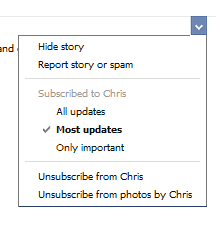
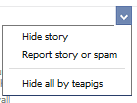
The same is not so versatile with brand pages however. Here you just have the option to hide the story, report it or alternatively hide all
Be aware that according to research by ExactTarget and CoTweet only 43% of your fans will actively unlike a brand. They are more likely to do nothing or click the “Hide All” button.
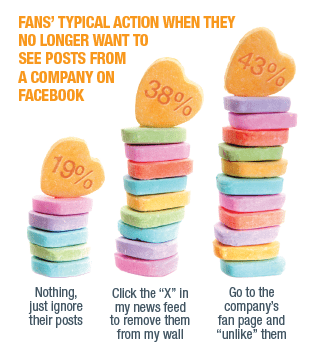
55% of Facebook users have ‘liked’ a company and later decided they no longer wanted to see the company’s posts.
51% fans said they rarely or never visit a company’s page after liking it.
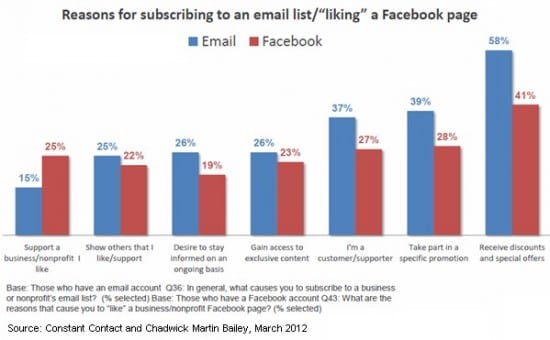
Given that 41% of fans like a page in order to receive discounts and special offers it is no surprise that so many messages are ignored or hidden.
Weight
Weight refers to the type of information Facebook deems is more valuable. Edges with higher weight include videos, photos and links. Each person’s Edge Weight is different, i.e. someone who likes browsing photographs is more likely to have them in their feed than someone who rarely clicks on them.
However, weight will also accumulate, so if a simple status update gets a lot of comments, likes and shares, it may well be given more weight so will overtake a photo.
I was at a seminar presented by Brighton-based SEO specialist @kelvinnewman recently where he suggested that weight is also politically driven. By this he means that Facebook is likely to prefer updates that are put directly into its platform rather than those scheduled via Hootsuite. Personally I don’t like using Hootsuite for this as despite the convenience of scheduling, it means you have the Hootsuite branding on your edge.
Kelvin also thinks that Facebook is likely to afford extra weight to its Facebook Deals.
It’s also likely that videos uploaded directly to Facebook will carry more weight than a link to a YouTube or Vimeo video.
Decay
With Facebook recency is a key driver. Posts decay incredibly quickly over time so new edges are favoured over older ones. Just as search engines are attracted to fresh new content, so too is Edgerank.
Of course one way to increase the visibility of your posts is to pay. Facebook's Sponsored Stories and Reach Generator (which claims to reach up to 75% of fans). The pattern of squeezing revenue from page owners looks set to continue. As users share more and connect with more Open Graph applications, there are more stories competing for newsfeed prominence. Increasingly, page owners will have to support their content efforts with paid media.
This is Part 1 of 2, Part 2 is what really matters - how to increase your visibility, but we needed to cover the principles first. Next week we will look at techniques for improving your Edgerank focusing on increasing Affinity and Weight and optimising Decay.