Email sequence contact strategy template
Use this spreadsheet to define triggered email sequences to support acquisition, conversion or retention
How will this spreadsheet help me and my business?
Research shows that behavioural email marketing is a powerful technique to automatically follow-up online customer actions to help increase conversion to sale at a low cost. However, the technique is still used by relatively few companies. One barrier to setting up these event-triggered email sequences is the time it takes to specify the sequences if behavioural email marketing is a new approach to the company or agency.
This spreadsheet is a template for marketers to create a messaging sequence that supports their business for the range of potential behavioural or event-triggered campaigns including:
- Welcome sequence for a new subscriber or lead to an email list
- Welcome sequence for new customer (onboarding)
- Reactivation of customers or subscribers who lose engagement
- Abandoned shopping cart follow-up emails
- Shoppers browse or search on a site but don't buy follow-up
- Time to repurchase or replenishment emails
What does the spreadsheet include?
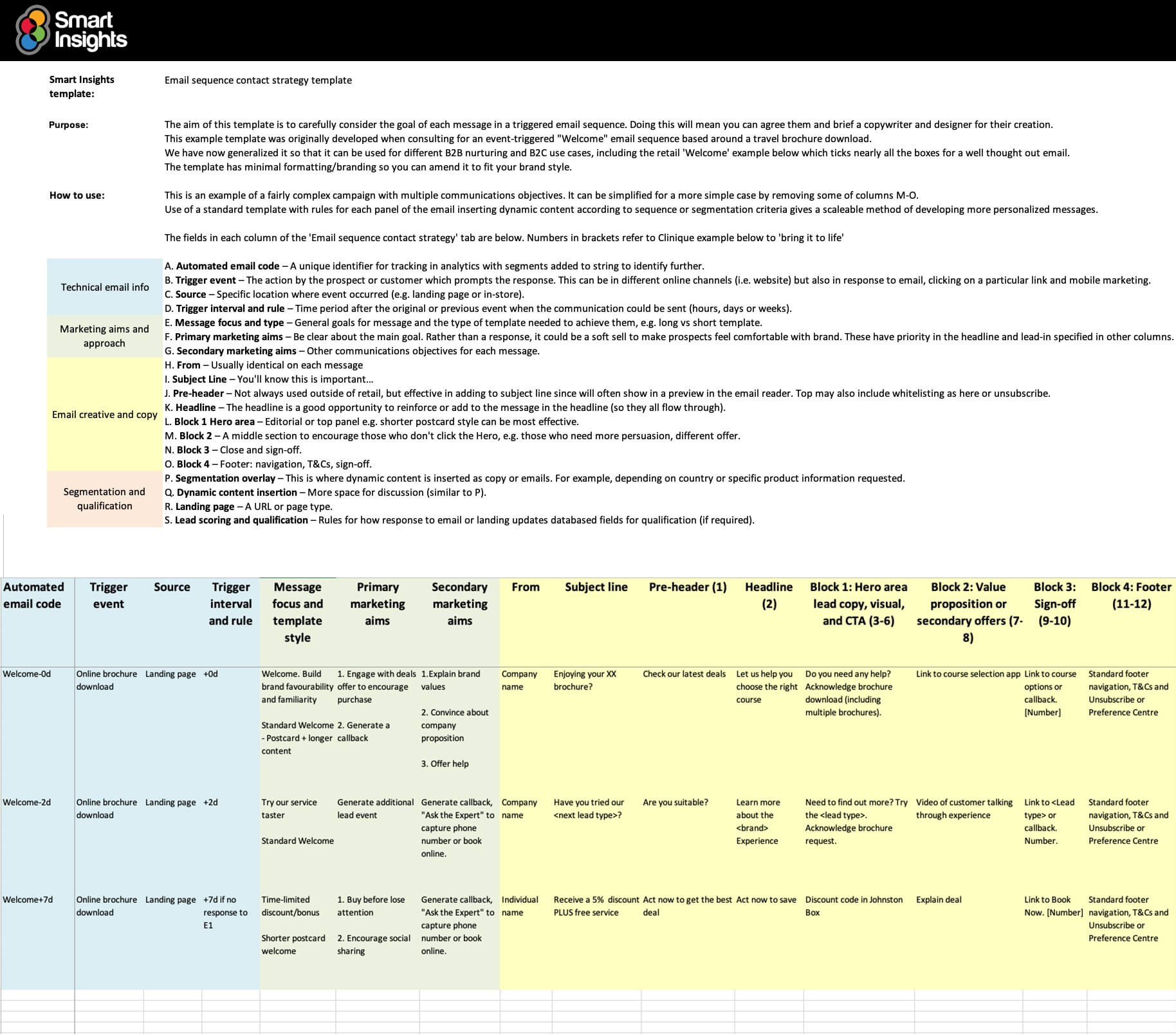
This example template was developed for an event-triggered 'Welcome' email sequence based around a brochure download. It's a classic inbound/permission marketing lead generation approach which can be used for B2C or B2B campaigns where access to content or a trial service is given in return for an individuals details. The template includes three worksheets, including:
- A 'ReadMe' tab explaining how to use each field with an example of how to lay out the creative
- A grid showing a row for each message in the sequence with 16 columns (some optional) for defining communications requirements, targeting, trigger rules and messaging. Three example fields are shown for an email sequence.
- A template of 8 other campaign control issues that must be defined including tracking, testing, unsubscribes and message suppression.
You can read more about how to plan email sequences in this introduction.
Who will find the spreadsheet useful?
The spreadsheet will aid collaboration between a range of people who may be involved with setting up and reviewing behavioural email campaigns including:
- Marketing or e-commerce managers responsible for creating communications strategy
- Email marketing execs
- Email or digital marketing consultants
- Agency or email service provider consultants
It can be used to agree communications goals between marketers and then brief specialist copywriters and designers.
Latest updates
This content has been updated into our latest worksheets styles, has been given a colour grading system, and has been given a relabelled example to aid readability. You can now clearly see how activities are grouped together as you move from preliminary technical and marketing information into crafting the email creative before finalizing your personalization options.
Resource Details
- Author: Dave Chaffey and Tim Watson
- Format: Online long-form guide
- Related resources: Guide to designing effective welcome emails, Design a welcome email journey Quick Win
About the authors
The guide was produced by Dave Chaffey and reviewed by Tim Watson.
It’s based on a ‘tried-and-tested’ approach originally developed by Dave Chaffey 10+ years ago when consulting with travel, retail and financial services businesses and updated through work with recent customers.
Dr. Dave Chaffey
 Dave is co-founder of Smart Insights and creator of the Smart Insights RACE Planning Framework. For his full profile, or to connect on LinkedIn or other social networks, see the About Dave Chaffey profile page on Smart Insights. Dave is author of 5 bestselling books on digital marketing including Digital Marketing Excellence and Digital Marketing: Strategy, Implementation and Practice. In 2004 he was recognized by the Chartered Institute of Marketing as one of 50 marketing ‘gurus’ worldwide who have helped shape the future of marketing.
Tim Watson

Tim Watson, from consultancy Zettasphere, is the Smart Insights expert commentator on email marketing. He is an independent email marketing consultant providing strategic guidance, to deliver improved campaign results. A member of the DMA Email Council and chair of the DMA Email Best Practice hub. He actively promotes email and frequently speaks on the subject and how to improve use of the channel. Connect with Tim via LinkedIn or Twitter.
 Paid membership is required
Access this resource now
All Paid memberships have full access to this and other guides in the Email marketing and marketing automation Toolkit.
Learn more about membership Already a paid member?Login here