Editorial calendar spreadsheet
Use our Excel editorial calendar to plan your campaigns and content schedule
How will this editorial calendar template help me and my business?
The pressures to publish engaging, timely content have never been higher, yet managing the workflow for this is really challenging. An editorial calendar is essential to help develop a plan to create content which both engages your audience and supports your content marketing aims. This template will give you more control over your content marketing approach to help:
- Provide consistency and quality in your content – content quality is key to making your brand engaging.
- Organize your team – anyone involved in the research/creation/publishing/interaction processes for content marketing.
- Give a framework and process to plan and manage the creation of content – structure means control and less of a last-minute approach.
- Enforce accountability – specifies who does what and when.
Who is this template for?
This template is for anyone who wants more control over their content marketing approach to help provide consistency and quality in your content and align their team. It gives you a framework and process to plan and manage the creation of content. Typical users of this guide include:
- Content marketing managers and marketing campaign managers
- Marketing managers and digital marketing managers
How is this editorial calendar template structured?
There are five different Excel worksheets included in this template to guide you through the content brainstorm and planning process:
- Brainstorm Content Ideas: How to brainstorm content ideas for your brand.
- Content Themes: A simple way of organizing your ideas into broad monthly themes on your site and social media.
- Operational Planning: Manage scheduling and production of your individual content marketing assets.
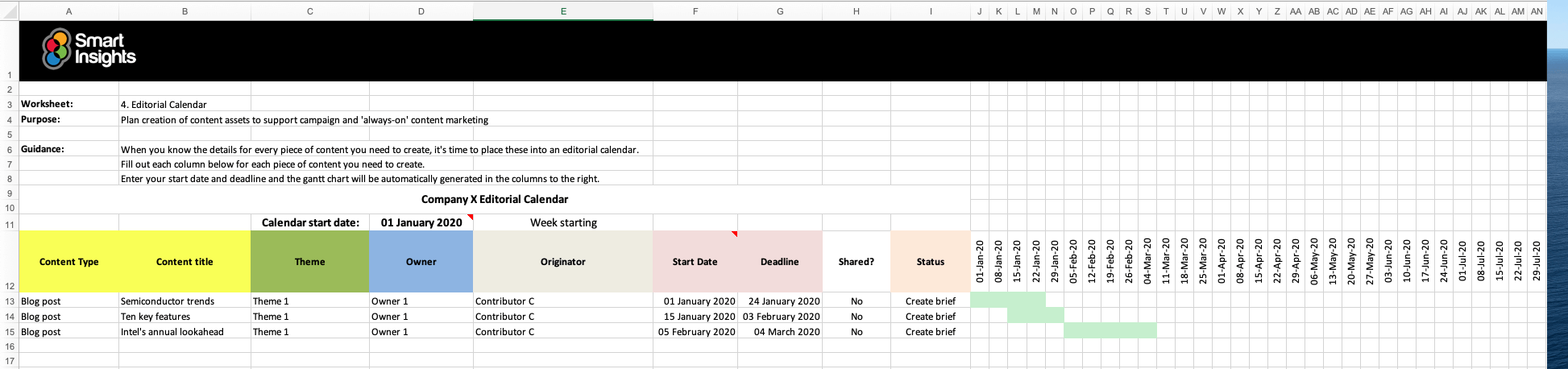
- Editorial Calendar: Set deadlines for your content and create a gantt chart for content creation.
- Social Media Calendar: A template for a month’s worth of social media post planning.
The spreadsheet helps you set up content publishing for different campaigns to make it quicker to plan the resources needed for:
- Content types and hooks to engage your audience
- Managing different content themes – easily selectable by a dropdown
- Integration of content with campaigns and product launches
- Publication deadline and status
- Content editors and originators – easily selectable by a dropdown
Latest updates
- This template has been structured to guide readers through the content creation process from brainstorming relevant content ideas through to planning weekly.
- The gantt chart included in the editorial calendar is now automatically generated based on members entering project start and end dates into the calendar, and includes more up to date dates.
- Additional guidance has been included to help you use the calendar.
Resource Details
- Authors: Dr. Dave Chaffey and Jill Quick
- Format: Excel spreadsheet for you to amend to help you create your content editorial schedules
- Related recommended resources: Don’t miss our Campaign timeline spreadsheet which gives a higher-level format for planning integrated campaigns, and our Create a content editorial calendar Learning Path module.
About the authors
Dr. Dave Chaffey
 Dr. Dave Chaffey is co-founder of Smart Insights and is a renowned digital marketing expert and speaker. He is author of 5 bestselling books on e-commerce including Digital Marketing: Strategy, Implementation and Practice and was recognized by the Chartered Institute of Marketing in 2004 as one of 50 marketing ‘gurus’ worldwide who have helped shape the future of marketing.
Jill Quick
 Jill Quick is a Digital Marketing Trainer and Consultant at Quick Marketing and co founder of The Coloring in Department. A candid and experienced marketer who loves to teach you not just how to “get” digital marketing in theory, but how to actually DO it.
 Paid Membership is required
Access this resource now
Content included depends on which paid plan is purchased. See membership options below for full details.
Membership options Already a Paid member? Login here